Fontys S3
Secure connections
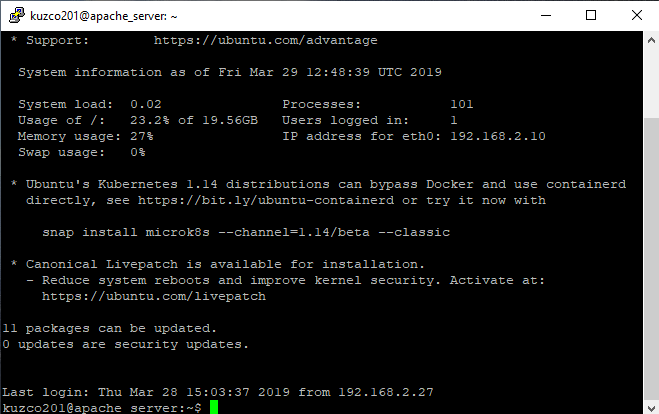
Here you can see that I made a SSH connection to my Ubuntu webserver. I use Putty as my SSH terminal. SSH is encrypted using PGP (Pretty good privacy) which uses a public and a private key to communicate with each other. This is especially helpful because you don't need to transfer passwords to encrypt the connection. The sending client encrypts its message using the public key from the recipient and the recipient decrypts the message using its own private key. This works the same the other way around. I can use this technique to remotely manage my webservers without the need physical access.
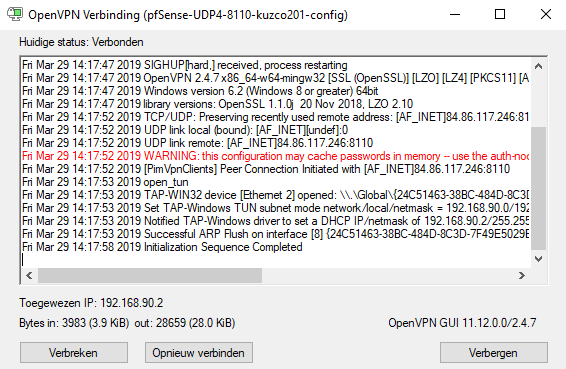
Here you can see that I'm connected to a VPN. This VPN is OpenVPN and runs on the PfSense router. It gives me access to the subnets I gave it access to and with this I can remotely manage my whole network, with being actually physically connected to the network. The OpenVPN connection is encrypted be TLS (Transfer layer security) which is successor from SSL. TLS uses a handshake at the start of the connection where a key is shared between the 2 clients. This key will be used for the symmetric encryption of the messages. The authenticity of the connection is secured by a certificate and the public key of the webserver this prevents possible man in the middle attacks, where someone will pretend to be another website for example.

Here you can see the ssl certificate I created for the website that is running my portfolio. I created the script using certbot in Ubuntu and the CA is Let's encrypt authority x3. The website automatically forces all traffic to https, the website is still accessible by http but will redirect the user to https.
- Date: March 2019
- Client: Fontys
- Category: Secure connections